

New Ways to Track, Motivate, and Manage Ticket Sellers
With summer in full swing, our team at Raffle Rocket is excited to release new improvements to our Sellers & Teams functionality.
These updates are designed to give administrators more control over seller attribution, help sellers track their own progress, and create more opportunities for friendly competition throughout your raffle.
We’ll walk through what’s new below.
New Sales Activity Pages for Sellers
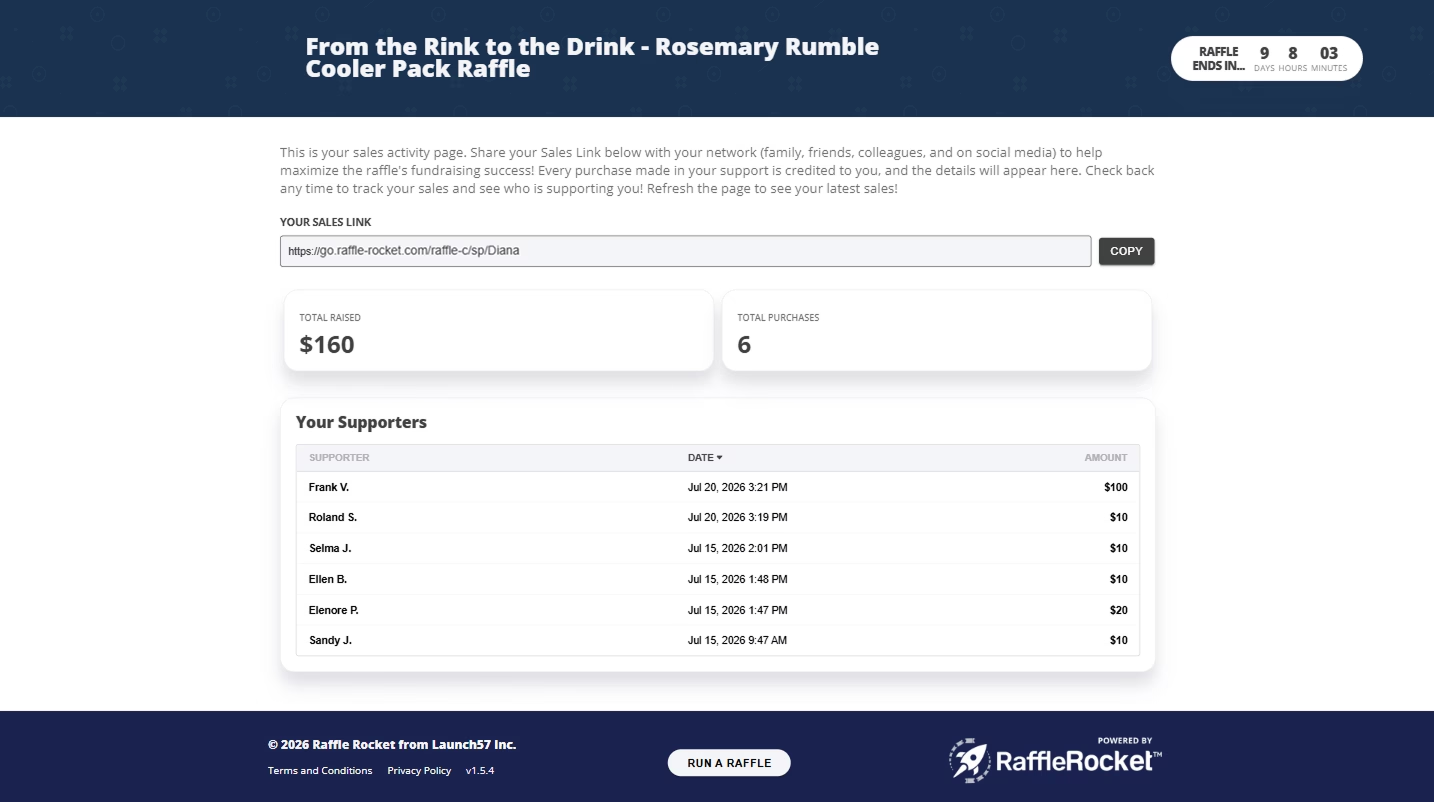
Every seller can now access their own private Sales Activity Page, giving them a simple way to track how they’re doing throughout the raffle.
From this page, sellers can view:
- Total amount raised
- Total purchases made in support of them
- A list of supporters who purchased through or selected that seller at checkout
This gives sellers more visibility into their progress and can help keep them engaged as they promote the raffle to their friends, family, teammates, and community.
Admins will also see both a seller’s Sales Link and Sales Activity Link directly in the dashboard, making it easier to copy and share the right links when needed.

Updated Seller Notifications
Seller notification emails have also been updated to include each seller’s Sales Activity Page link.
That means when admins notify sellers, they instantly get the links they need to both promote the raffle and monitor their own results. This is especially helpful for organizations running raffles with multiple sellers who are actively helping drive ticket sales.
Introducing the Top Sellers Leaderboard
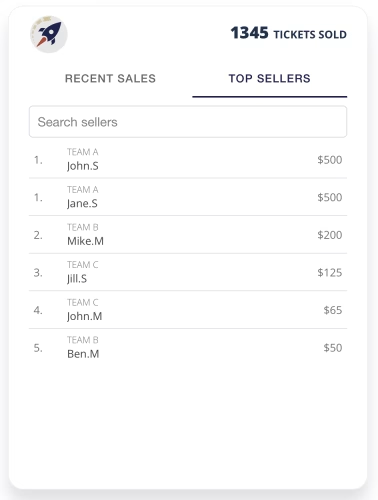
Admins can now choose to display a Top Sellers leaderboard directly on the raffle page.
When enabled, supporters can switch between Recent Sales and Top Sellers to see which sellers have raised the most. The leaderboard ranks sellers by total amount raised and also includes search functionality, making it easier for purchasers to find the seller they want to support.
This feature is a great way to spark friendly competition and recognize the people helping promote your raffle.

Require Seller Selection at Checkout
For organizations that need every sale attributed to a seller, admins can now require purchasers to select a seller before completing checkout.
When this setting is turned on, purchasers will not be able to complete their purchase until a seller has been selected. This requirement also applies when admins enter offline orders.
This gives organizations more control over seller attribution and helps ensure sales are properly tracked from the start.
Deactivate Sellers Without Losing Sales History
Admins can now deactivate sellers who should no longer receive new attributed sales. Once deactivated, a seller will no longer appear as an option at checkout, when filling out offline orders, or when reattributing a sale post-purchase. However, their previous sales history will be preserved.
That means past sales remain visible in the Sellers table, Overview page, exported reports, leaderboard, and the seller’s Sales Activity Page. This gives admins more flexibility to manage seller participation without losing important historical data.
Improved Purchase Confirmation Messaging
Lastly, we’ve also updated the post-checkout confirmation experience. When a purchaser supports a specific seller, the confirmation screen and Tickets Purchased email will now recognize the seller they supported.
If no seller was selected at checkout, the confirmation messaging will remain unchanged. This small update helps create a clearer experience for purchasers and gives sellers more recognition when their network supports the raffle.
Wrapping Up
These Sellers & Teams enhancements were built to help organizations better manage seller-driven raffles from start to finish.
Whether you’re running a raffle with players, students, families, volunteers, or multiple teams, these updates make it easier to track performance, motivate sellers, and ensure sales are attributed accurately.
If you have questions about using Sellers & Teams for your next raffle, our team is here to help.
Start setting up your own online raffle fundraiser!
More from our blog

Data-Backed Church Fundraiser Ideas & Prizes
Looking for church fundraiser ideas that bring in real results? Learn what’s working for religious organizations on Raffle Rocket.

Raffle Rocket vs. Rafflebox Review
Comparing Raffle Rocket and Rafflebox for your next fundraiser? We break down pricing, features, raffle types, and support so you can choose with confidence.

How to Choose the Best Online Raffle for Charity, Nonprofits, Schools & More
Not sure which raffle is right for your fundraiser? Learn how charities, nonprofits, schools, and religious organizations can maximize funds.